Raw Recovery
Raw Recovery is a window that lists the files found by carving on the object selected in the main window. Carving finds files by their content instead of by the file system, so the list is grouped by file type: there are no folder names, because there are none left to recover.
Open it with the Raw Recovery button on the main window toolbar. It works on the results of an Advanced Scan, because the information carving needs is collected while the Advanced Scan runs. If the selected object has not been scanned that way, the program says so - run the Advanced Scan first, then open the window.
Finding a file
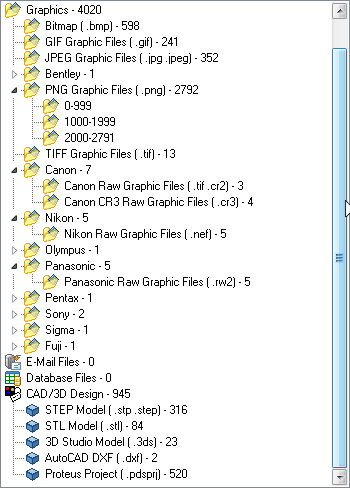
- The tree lists the categories that were found, each with the number of files in it - Archives, Documents, Graphics, E-Mail Files, Database Files and CAD/3D Design. Open a category to reach the individual formats inside it; in Graphics, the camera raw formats sit under the maker they belong to.
- Select a format to list its files, with their Name, Size and Type. The status bar shows how many entries the list holds and how many were found on the object in total.
- A format that produced a very large number of hits is split into groups of 1000 (0-999, 1000-1999, and so on) so that the list stays quick to draw. Select a group to list just those files.
- Graphics are listed with thumbnails. They are generated as you work, with progress shown in the status bar.
Checking a file before recovering it
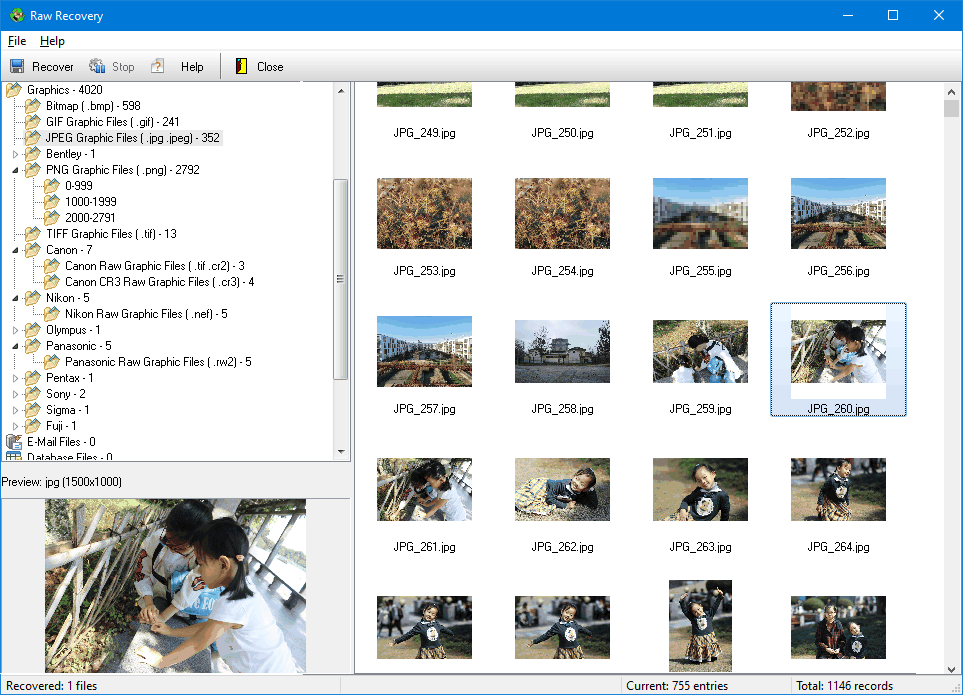
Selecting a row previews that file in the pane below the tree, reading it straight from the drive. Anything the program cannot show is displayed as a hexadecimal dump instead. Carving matches signatures, so a hit is not proof of an intact file - preview before committing to a recovery.
Recovering
- Select the rows you want. Hold Shift or Ctrl to extend the selection.
- Press Recover on the toolbar, or right-click a row and choose Recover, and choose a destination folder. A folder on the drive being recovered is refused, because writing there can destroy the data you are trying to rescue.
- Files are written as the format name, an underscore and a number - JPG_1.jpg, PNG_1.png, BLEND_1.blend - numbered from 1 for each format.
- The Recovery Summary reports how many files were processed, how many were recovered and how many failed. Press Show Details there for the list of failures.
Press Stop to end a long recovery. Files that were already written are kept, and the summary still appears.
Notes
- How far the scanner looks ahead for the end of a file of each type is set by the Default Size and Max Size columns on the Options - Raw Recovery page. Raise them only for a format you are actually missing.
- The window belongs to the object you opened it from. To carve a different drive or partition, close it, select that object in the main window and open it again.
- In the demonstration version files larger than 1 MiB are not written. Registering the product removes the size limit.
Supported formats
Raw recovery looks for the formats below. Only the ones that were actually found are listed in the tree, each with the number of files it produced.
- Archives - RAR (.rar), ZIP (.zip .jar .afz), GZIP (.gz .gzip), Cabinet (.cab), TAR (.tar) and BZIP2 (.bz2).
- Documents - Word 97-2003 (.doc .dot .asd), Excel 97-2003 (.xls .xla .xlt), PowerPoint 97-2003 (.ppt), PDF (.pdf .ai), Rich Text (.rtf), WordPerfect 6 to 10 (.wpd .wcm .wpt), Visio Drawing (.vsd .vss .vst), Compiled HTML Help (.chm), and the 2007 formats Word (.docx .docm .dotx .dotm), Excel (.xlsx .xlsm .xltx .xltm .xlsb) and PowerPoint (.pptx .pptm .potx .potm).
- Graphics - Bitmap (.bmp), GIF (.gif), JPEG (.jpg .jpeg), PNG (.png), TIFF (.tif), Corel Draw (.cdr), Bentley MicroStation (.dng) and Adobe Photoshop (.psd .8bps). The camera raw formats are listed under the maker: Canon (.tif .cr2 and .cr3), Fuji (.raf), Kodak (.dcr), Konica-Minolta (.mrw), Leica (.raw), Mamiya (.mef), Nikon (.nef), Olympus (.orf), Panasonic (.rw2), Pentax (.pef .dng), Samsung (.dng), Sigma (.x3f) and Sony (.arw .sr2 .dng).
- E-Mail Files - Outlook personal folders (.pst), Outlook messages (.msg), Outlook Express (.dbx), Windows Address Book (.wab) and MBox (.mbox).
- Database Files - Access 97-2003 (.mdb), Access project (.adp), Access 2007 (.accdb) and Microsoft Money (.mny).
- CAD / 3D Design - Blender (.blend), Autodesk FBX (.fbx), CATIA V5 (.CATPart), SolidWorks (.sldprt), Autodesk Inventor (.ipt), STEP (.stp .step), STL (.stl), 3D Studio (.3ds), AutoCAD DXF (.dxf), AutoCAD DWG (.dwg) and Proteus project (.pdsprj).
A file type that is not in this list is not carved. Such files can still be recovered from the main window, as long as their directory entries survived.
Related topics
More in Recovering & preview
- Recovering FilesFiles are recovered from the file list. Select the rows you want and press Recover on the toolbar, or right-click a row and choose Recover.
- Finding FilesOnce an object has been scanned, the file list can be searched. This is much quicker than scrolling through tens of thousands of recovered entries looking for…
- StatisticsStatistics counts what a folder - or a selection of rows - contains: how many subdirectories, how many files, and how much data.
- PreviewThe Preview pane reads the selected file straight from the drive and shows you what is in it - without recovering it first.