HDD Health
HDD Health reads the S.M.A.R.T. attributes of a drive and explains what they mean. Use it to judge whether a drive is still safe to use, and how urgently its contents need to be copied somewhere else.
Open it from the Tools menu, choose the drive from the list at the top, and the attribute table fills in: attribute name, ID, current value, worst value, threshold, raw data, a plain-language meaning, and a status.
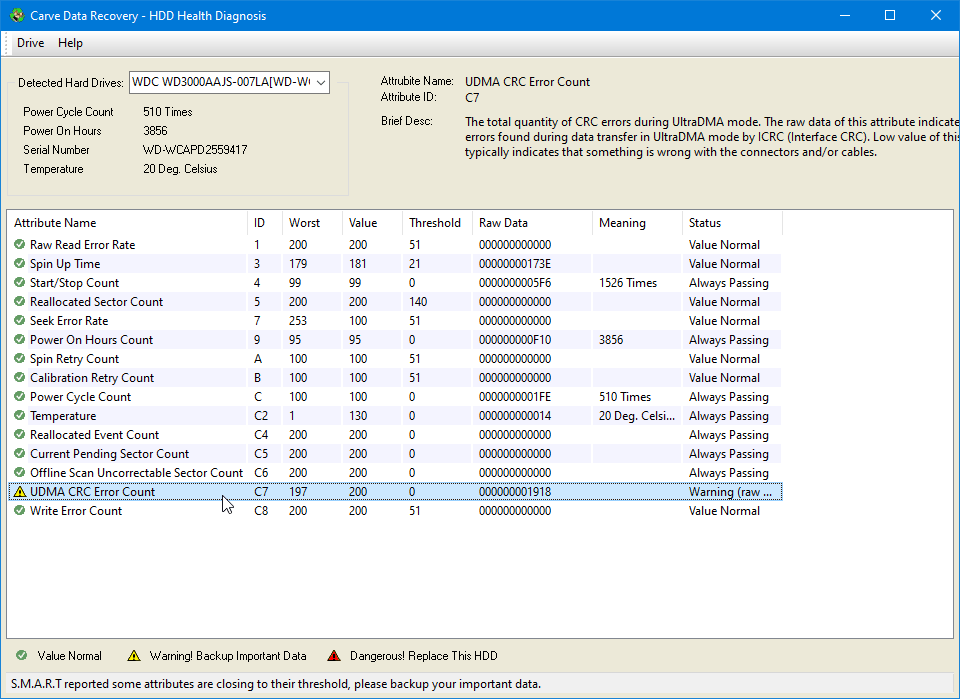
What the status means
- Value Normal - the attribute is within its threshold.
- Warning! Backup Important Data - the drive is degrading. Copy anything important off it now.
- Dangerous! Replace This HDD - the attribute has reached or passed its threshold. Stop using the drive.
USB drives
Drives behind a USB-to-SATA bridge are supported. The bridge passes the commands through unchanged, so if the drive answers them the attributes are read as usual.
When the list is empty
S.M.A.R.T. is optional. A drive may simply not implement it, and a failing drive may answer with data that does not pass validation instead of with real attributes. In that case the program shows an empty list and explains why in the status bar, rather than displaying numbers it cannot trust.
No restrictions
Every attribute of every drive is shown, with no time limit and no limit on how many drives you may check. Reading drive health is not restricted in the demonstration version.