Search for Lost Partitions
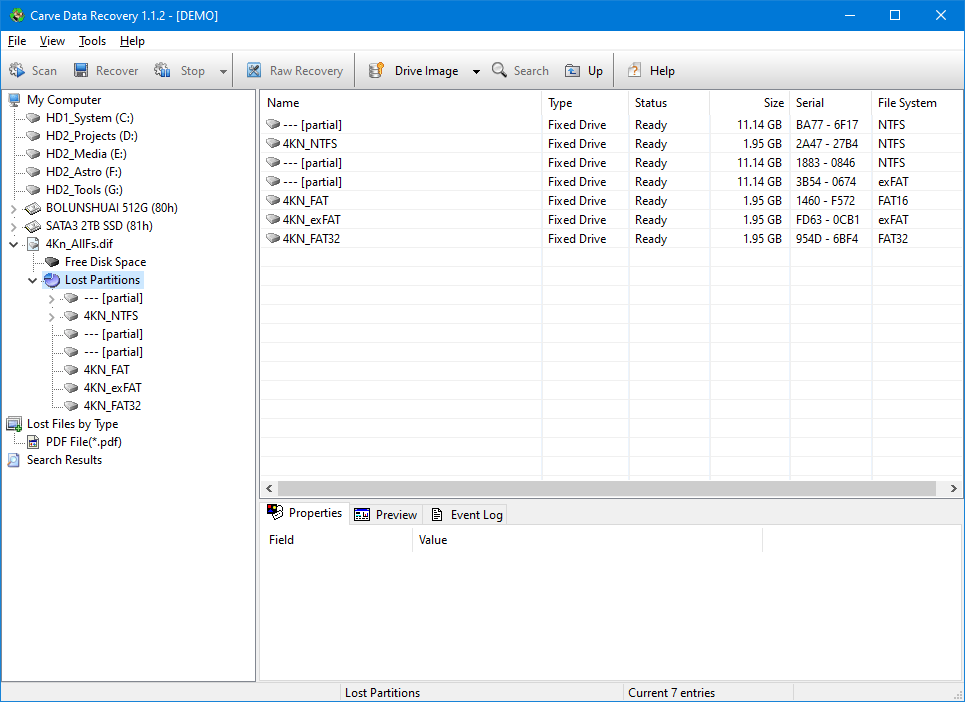
This scan looks for the boot sectors of volumes that are no longer listed. Each one it recognises is added to the tree as a separate partition, with all of its files and folders. It is much faster, and gives much better results, than scanning the same region as raw free space - because once a partition is recognised, Standard Scan and Advanced Scan can work on it normally.
When to use it
- A partition was deleted or the partition table was damaged, and the volume no longer appears in My Computer.
- A drive was repartitioned and the old layout needs to be found again.
- The disk is an image, or a whole physical drive, and you want to know what volumes it used to hold.
What it can be applied to
- A physical drive.
- A loaded drive image.
- Free disk space.
How to run it
- Select the physical drive, image or free-space region in the tree.
- Press Scan and choose Search for Lost Partitions, or use Tools -> Search for Lost Partitions.
- Accept the scan range, or narrow it if you know where the lost volume was.
- When the scan finishes, look under Lost Partitions. Each volume that was found is a node you can select and scan in the usual way.
Limitations
- A volume whose boot sector has itself been overwritten cannot be recognised. Use Advanced Scan on the surrounding free space instead.
- A backup copy of a boot sector is not reported as a separate partition; the program recognises it as a duplicate of the volume it belongs to.
Related topics
More in Scanning
- Standard ScanStandard Scan reads the file system on the selected object and lists the files and folders it describes, including the entries that have been deleted.
- Advanced ScanAdvanced Scan does not trust the boot sector. It walks the disk sector by sector, picks up the records that describe files and folders wherever it finds them…
- Save and Resume a ScanAn Advanced Scan of a large drive can run for a long time. If you stop it - because you need the machine, or the drive is getting hot - you can have the…